How to make a menu that sells
Your menu is the first thing a guest reads about your place, at the door, at the table or on a phone. Build it in the right order, from the dishes to a printed and an online version that say the same thing.
Start with the dishes, not the design
The number of dishes sets the layout, the number of photos and the room you have for descriptions. So start with a list of everything you sell and note for each dish how often it leaves the kitchen in a week and what it earns you. How to work out that last figure is in the article on your food cost percentage.
Then keep the menu short. Every dish you add is one more ingredient in your fridge, one more task in your rush and one more chance that something has run out, and your best dishes get lost among the rest. Which ones to cut or move to the front is covered by menu engineering.
Balance the sections as well. These are starting points for a dinner menu, not rules:
| Section | Starting point | What to watch |
|---|---|---|
| Starters and small plates | 6 | Light and hearty, at least one vegetarian |
| Main courses | 8 | Meat, fish and vegetarian side by side |
| Desserts | 4 | One fresh, one rich |
| Alcoholic drinks | 8 | Coffee, tea and soft drinks do not count |
A pizzeria or a snack bar divides things differently. The idea stays the same: your guest takes in each section at a glance.
Pick fonts and colours that fit your place
Choose two fonts and a handful of colours that your place already wears, from your facade, your logo and your website. How to handle that as a whole is in the article on your restaurant as a brand.
Set the descriptions in a calm typeface without flourishes and keep the decorative one for headings. Use one accent colour for what you want seen, such as the dish of the day or the seasonal plate: if everything stands out, nothing does. Keep the contrast high, and read your menu the way a guest will, in the evening light of your dining room or on a phone in the sun.
Write descriptions that let guests taste the dish
The description is where a dish sells itself, because a guest can only choose what they can picture. Use a few of these building blocks for each dish:
- How it is cooked or how it tastes: grilled, crisp, slow-braised, spicy.
- Where it comes from: salmon smoked in-house, bread from the bakery round the corner.
- What makes it special: a seasonal plate, only this month, on the menu for years.
- One line of story: a family recipe, the reason it has that name.
Here is the difference, with invented examples:
| Without care | With care |
|---|---|
| Bitterballen, 8 pieces, 8.50 | Eight bitterballen with a crisp crust and a beef ragout seasoned with nutmeg, served with coarse mustard. 8.50 |
| Soup of the day, 6.50 | Creamy tomato soup with basil and a slice of bread from the bakery round the corner. 6.50 |
Keep it to two sentences, because longer text clutters the menu. What you write has to be true: house-made, fresh and organic are promises, and guests, especially guests with an allergy, build on them.
The story of your place itself belongs on your about page, not on every dish. How to write that page is in this article.
Prices, sizes and extras
Which price belongs to which dish is worked out in the article on pricing your menu. Here it is about how you write them down.
One thing is a rule and not a matter of taste: prices shown to consumers include VAT. The ACM, the Dutch consumer authority, uses a menu with coffee at 2.75 euro as its own example. Costs a guest cannot avoid belong in the price or sit clearly next to it. You do not have to state the VAT amount itself.
The rest is your choice. Leave out the euro sign if it makes the menu calmer, as long as nobody can doubt what the number means. Put the price after the description rather than in a column on the right, so your guest reads the dish first. Pick one style and keep it, online too.
Sizes and extras
If a dish comes in two sizes, put them on one line: small 11.50, large 14.50, with a note of what the difference is. Drinks need their volume. Extras get their own line and price. Online, never pre-tick them, since according to the ACM optional extras may not be selected by default.
Photos: few on paper, many online
A good photo removes doubt, a bad one works against you. If you do not have a good photo of a dish, leave the picture out.
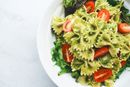
If you hire a photographer, have them shoot your top dishes in half a day on the same plate and background. If you do it yourself, use daylight by a window and photograph the portion exactly as you serve it. A guest who receives something different from the photo feels cheated.
Space on paper is tight. Pick one or two photos and give them to the dishes that earn the most, not to your favourite. Online there is room for a photo with every dish that deserves one. Reuse them for your website and Instagram, which this article covers.
Photos carry copyright automatically. The KvK, the Dutch chamber of commerce, advises agreeing terms with the photographer, so settle in writing what you may use them for. Do not use photos from other websites.
The layout, and a template to start from
A well-known rule for a one-page menu is the golden triangle: the eye goes to the middle first, then the top right, then the top left. Put the dishes you most want to sell there. Treat it as a design rule: your own sales figures show whether it holds for your guests.
For takeaway, a menu that folds in three works well, with room for your phone number, address, opening hours and a QR code to your ordering page. Icons for spicy or vegetarian, a box for seasonal dishes and a block for combinations guide the eye. Menus that do this well are collected in menus worth learning from.
The template, from top to bottom
| Part | What goes in it |
|---|---|
| Header | Name, logo and one line about who you are |
| Below the header | The allergen sentence and the key to the icons |
| Starters | Six dishes, the lighter ones first |
| Main courses | Eight dishes, the top earners in the middle and top right |
| Sides and extras | Fries, salad, sauce, each with its own price |
| Desserts | Four dishes |
| Drinks | Hot, cold, beer, wine, with the volume |
| Footer | Prices including VAT, the alcohol rule, address, phone number, website and QR code |
Common questions
- How many dishes should a menu have?
- Six starters, eight main courses and four desserts is a useful starting point for a dinner menu. A pizzeria or a snack bar divides things differently.
- Do allergens have to be on the menu?
- Not necessarily. Telling guests out loud is allowed too, but a notice must clearly say they can ask, and the information must be ready on paper or digitally.
- Are menu prices shown including or excluding VAT?
- Including. According to the ACM, prices for consumers include VAT and any costs a guest cannot avoid. You do not have to state the VAT amount itself.
- From what age can I sell alcohol?
- From 18, for all alcohol. If you doubt a guest's age, ask for ID. Online, the guest confirms while ordering that they are 18, and their age is checked again at delivery.
- Is a PDF of my menu enough for my site?
- Not for a phone. Put the menu on a page as plain text, since a PDF reads badly on a small screen and is harder for search engines to find.